Entering Past Data

Entering Past Data


Introduction

When starting with Welina, many users may wish to add past data to client graphs for more robust visual analysis options. Welina is able to offer this function!

Info
When entering past data on the Welina platform, data can be entered by previous date, rather than by program. For example, users can enter data for all programs implemented on 1/10/26 (a date in the past). The option to enter data within one program at a time (e.g. entering the past month of data for a “Tacting Colors” program) is not yet available


How to Enter Past Data

1. Create a Lesson Note Template for past data entry

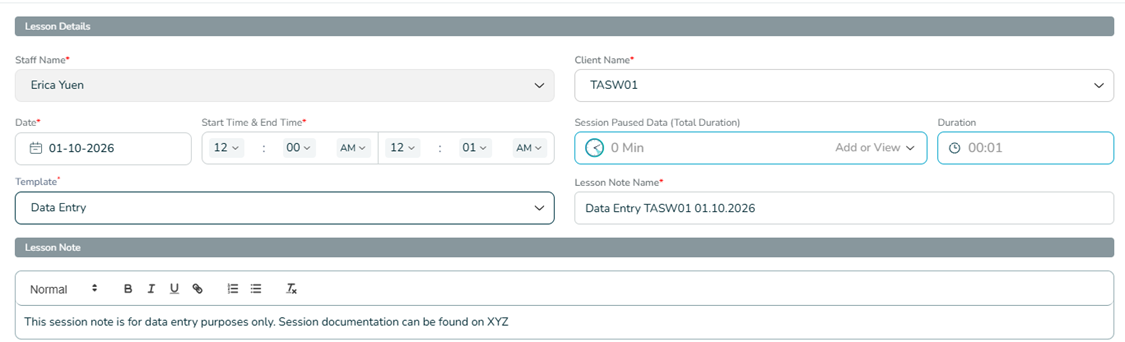
Currently, all program data in Welina needs to be attached to a Lesson Note. If there is already session documentation for past dates on which users wish to enter data, a simpler template specifically for past data can be created and used so that the entire session note does not have to be re-created.

See below for an example of a template that can be created:

2. Create a Web-Based Lesson Note 

Create a Web-Based Lesson Note for the date on which past data is being entered. For instructions on how to do this, Click Here

When creating this Web-Based Lesson Note:
- Select Client
- Select the past date for which data is being entered
- Select "Past Data" Lesson Note template that has been created
- Select any start/end time
- Add any Skill, Behavior, and ABC data for this date

-           


3. Continue for any other past dates 

Create web-based lesson notes for all past dates on which past data needs to be entered. 


    • Related Articles

    • Editing Skill & Behavior Data on the Welina App

      After completing a session (e.g. tapping and confirming “Complete”) in the Welina App, users will have the ability to review and edit data before submitting their Lesson Note. This allows for correction of any errors made during in-session data ...
    • Building ABC Data Sheets

      Through the Welina website, users are able to create client-specific ABC Data Sheets to be used by any provider using the Welina App to collect direct data on the client. This allows you to create checklists for Antecedents, Behaviors, Consequences, ...
    • Downloading Notes and Behavior Data

      Lesson notes, behavior data graphs, and raw behavior data can be easily downloaded from Welina to ensure you have access to take your data where ever you need. Downloading Session Notes Navigate to Reporting and Analytics > Lesson Notes Choose the ...
    • Measurement Tool Types When Creating Target

      When creating skill acquisition programs you will need to set the Measurement Tool you want to use for Data Collection of the target you are creating. Below is a break down of each Measurement Tool. Trial-by-Trial (Including Opportunity-Based) Data ...
    • Editing Skill Acquisition and Behavior Data on Welina Web

      Welina offers the function to edit behavior data for completed session notes on the web. If data on a note is edited by someone other than the individual who completed the note, the note will be sent back to the individual who competed to note for a ...